Case Study · WS Audiology · 2024 to 2026
AI assistant
Senior Product Designer · Android & iOS · Conversational AI · Pilot-ready
A conversational AI assistant for hearing-aid companion apps, co-made with the ML and product teams. I led the conversation and UX design from research through a tone-of-voice framework and four answer-structure types. It rested on a survey of 100+ wearers across four countries and two rounds of testing, and shipped to engineering pilot-ready.
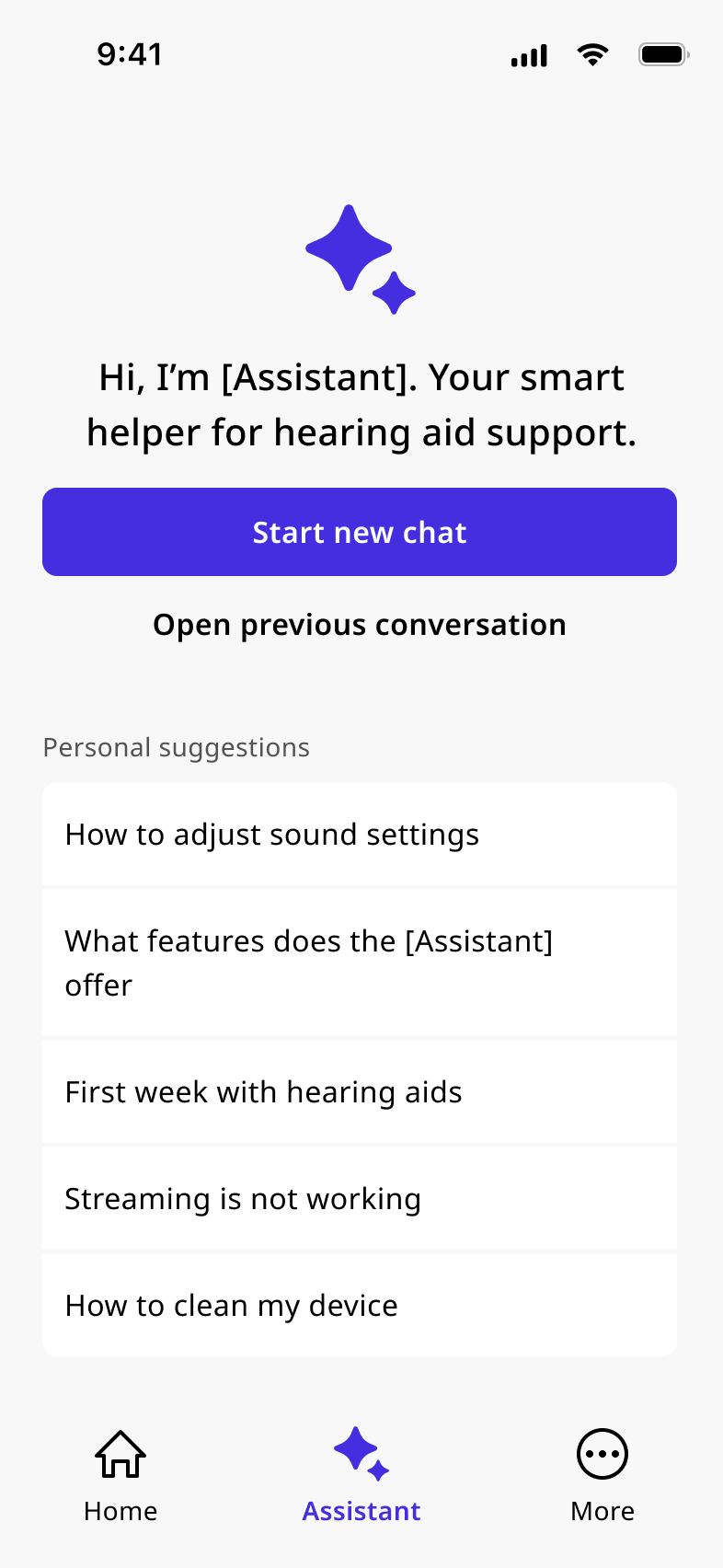
A conversational AI feature for hearing aid companion apps. I led the conversation and UX design, working with the ML and product teams. The assistant gives users contextual support for device issues, sound settings, and troubleshooting without leaving the app or waiting for their audiologist. I validated the design with users across three countries and handed the conversation system to engineering, who built the pilot.
WS Audiology is one of the largest hearing-aid manufacturers globally, serving users across more than 125 markets. The assistant sits inside the companion app that pairs with the devices, for troubleshooting and settings adjustments.
Stuck between a manual and a phone call
More than a million hearing aid users rely on the companion app. Issues came up constantly: Bluetooth problems, unfamiliar sound settings, features that didn’t behave as expected. Their only options were to search a FAQ, open a printed manual, or call their hearing care professional. All three were slow, inaccessible in the moment, or dependent on someone else’s availability.
How do we give hearing aid users immediate, contextual, trustworthy support through a conversational AI, without overwhelming them, hallucinating harmful advice, or sidelining their HCP?
Conversation designer
Sole conversation designer on the team. Covered the full design layer from research principles to pilot scope decisions and engineering handoff.
- Pilot scope decisions
- Conversation flow design
- Answer structure system
- Tone of voice framework
- Usability test planning
- ML handoff documentation
- Product Manager: pilot strategy, KPI definition, stakeholder alignment
- ML and engineering: LLM integration, device context, prompt engineering
- Content Specialist: brand tone application, answer copywriting
- Visual Designer: branded components, wireframe collaboration
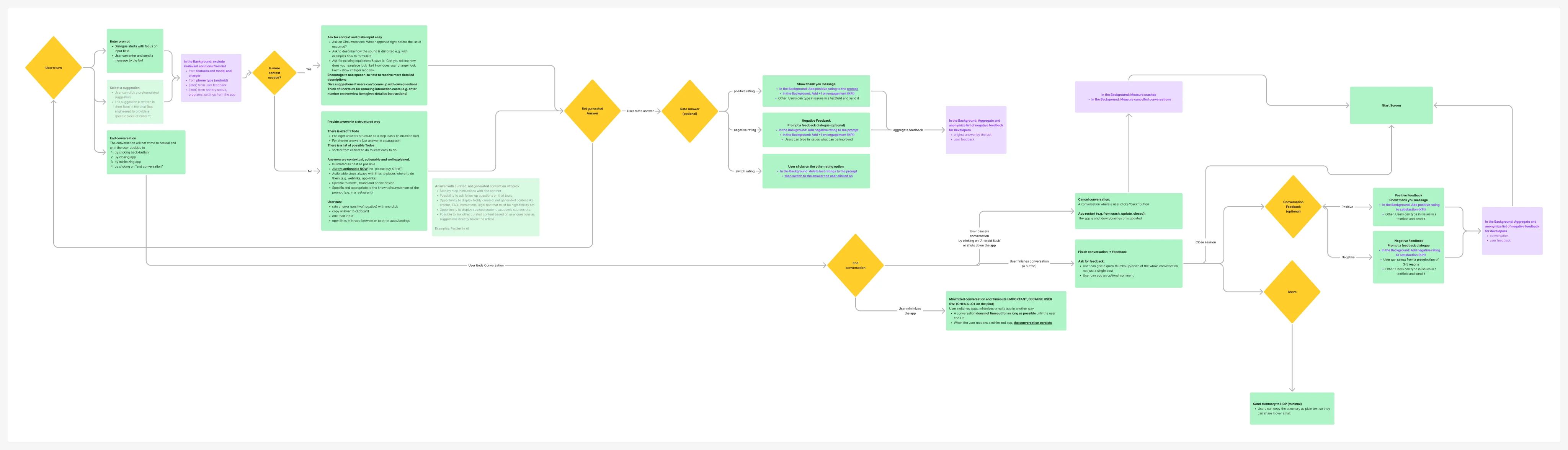
From principles to pilot across 5 major iterations
Five iterations: principles and four answer-structure rules first, then the core flow, two rounds of usability refinement, and finally tone and the multi-brand handoff.
Survey, competitor analysis and research
The research focused on the Hearing Aid Wearer (HAW): people actively managing hearing loss in daily life. Someone troubleshooting in a noisy restaurant, asking a question at night when their audiologist isn’t available, or figuring out why their hearing aids won’t connect.
Multi-country survey · 100 participants · France, Germany, US and Japan
- HAWs strongly preferred "AI Assistant" over "chatbot". The latter triggered negative associations with automated phone systems.
- Top concern was data privacy. Users wanted transparency on what stays on-device vs. anonymised.
- Voice input rated highly valuable, especially for older HAWs in real-time situations.
- Users wanted max 3 solution options at once, not exhaustive lists.
Competitor analysis · ChatGPT, Copilot, Rosebud, Genie, Gemini
Reviewing seven products surfaced patterns to adopt, avoid, and resolve before design began.
- No message editing. Tools like ChatGPT and Gemini let users edit a sent message. Here that would blur regeneration and version history and reopen answers people had already resolved, so it was left out. A follow-up message clarifies without the confusion.
- Disclaimer inline, not as overlay. Overlays get dismissed reflexively. Embedding the disclaimer as the first chat message keeps it contextual and readable.
- Suggestions must not override user intent. Contextual prompts help hesitant users, but as tabs or persistent filters they pull focus away from the original goal.
- Rosebud’s end-of-conversation summary is the strongest pattern for closing complex support sessions. The user controls the ending, gets a summary, and the moment triggers feedback naturally.
- Never show online status. No product reviewed does. Only surface connection state when offline.
- Follow-up questions beat related topics. Suggesting a next question outperforms a list of related links for keeping users on their original goal.
Accessibility research · Inclusive design for AI chatbots
Hearing aid wearers are disproportionately elderly. Accessibility was a core product constraint. A dedicated research sprint covered empathy-first design, elderly user needs, chatbot-specific a11y patterns, and Android a11y testing.
- The chat message list must be a live region so TalkBack announces new responses without interrupting the user. This shaped the core message container pattern from the start.
- Suggested reply buttons need descriptive accessible labels beyond the visible text. "Show me how to reconnect" beats "Yes" for screen reader users.
- Progressive disclosure serves accessibility as much as UX. Short answers first, detail on demand. This directly shaped the answer structure types.
- Voice input must fail gracefully. For elderly HAWs it is a primary input mode, so the fallback to text must be smooth and clearly signalled.
- Situational impairments — noisy restaurant, bright sunlight, one-handed use — are common. Clarity and low cognitive load became baseline requirements throughout.
Conversation structure
The core flow begins when a user types or taps a message. For common issues, the assistant first reads live device context (app version, Bluetooth state, and hearing aid connection) and delivers a structured answer matched to the problem.
Rather than free-form LLM output, I defined four answer structure types with explicit formatting rules. This made responses scannable and gave the model clear guardrails.
- Overview. Multiple options presented for ambiguous or multi-branch problems. Max 3 at a time.
- Step-by-step. One step at a time, with embedded UI mockups for hardware-adjacent actions.
- Generic answer. Direct paragraph for factual, in-scope questions. No lists. Contextual CTAs follow.
- Praise / Sorry. Emotional tone responses. Short, warm, never performative. Used sparingly.
First-time users see a dismissible AI disclaimer. Return users land on a personalised start screen with contextual suggestions based on app usage, device context, and previously visited topics.
Adjusting real device settings
When a user mentions a sound quality concern in conversation, the assistant identifies the issue and offers to initiate fine-tuning. It adjusts the Universal hearing program directly through a structured question sequence: situation, problem area, and specific quality. The assistant resets settings, asks targeted questions, applies the changes, and confirms the result.
Fine-tuning as a distinct mode
When it activates, the assistant explicitly tells the user that support questions are paused for the duration. "Paused" is literal: the text input is disabled. The user cannot ask anything else until the session ends or is cancelled.
The keep/revert pattern
After settings are applied, the assistant asks "How does it feel?" and offers two options: keep the new settings, or revert to the previous ones. Either choice closes the fine-tuning session and returns the user to a normal support conversation.
Two rounds of testing
Internal sessions · WSA offices, Denmark and Germany
Sessions ran as 20-minute guerrilla tests. Participants explored the assistant freely without a script and gave live thumbs up/down on individual responses.
- Speech-to-text consistently transcribed "hearing AIDS" as a phrase. Flagged and fixed before external testing.
- Links to external pages triggered cookie banners inside the app. Fixed with an in-app browser.
- "Talk to a human" was a dead end with no follow-through. Actionable summary share added.
- Inconsistent bold formatting in numbered lists caused confusion. This drove the unified answer structure system.
External sessions · US · 7 HAWs · Real hearing aids
Hearing aid wearers, using their own devices, tested the assistant on device issues. The findings reshaped both information hierarchy and the feedback model.
- HAWs needed concise answers first, detail on request. This drove progressive disclosure throughout the flow.
- Suggestion labels phrased as topics were confusing. Rewritten as action-oriented prompts.
- Feedback labels ("correct", "complete") felt ambiguous. Simplified to thumbs with structured reason tags.
- All 7 HAWs preferred the assistant over Google or YouTube for hearing aid-specific queries.
Feedback system
I designed a two-layer feedback system: a per-message action menu triggered by long-pressing any assistant response, and a structured feedback sheet with labelled reason tags plus a 400-character optional description. All feedback is anonymised and aggregated for the ML team, not tied to individual users.
- Long-press action menu. Triggered on any assistant message. Shows three options: Report positive feedback, Report negative feedback, Share message. Low friction: one tap to initiate.
- Structured reason tags. A bottom sheet with pre-defined tags and an optional 400-character description. Tags give the ML team quantifiable signal; the description leaves room for context the tags can't hold.
Initial prototypes had only a free-text field. Testing showed users rarely wrote anything, and the qualitative data was hard to aggregate. Structured tags gave the ML team quantifiable signal; the optional description caught the rest.
One system, different identities
Three brands run on a single conversation engine. Any guardrail, fallback pattern, or accessibility requirement in the shared layer ships to all three at once, and brands cannot override it. The architecture is explicit about what each brand can touch.
- Customisable per brand. Logo and icon, brand colour accents, HA model and feature references, HCP handover services, tone of voice application layer.
- Shared across all brands. Conversation flow logic, answer structure system, hallucination guardrails, accessibility requirements, feedback architecture, KPI measurement layer.
Tone of voice framework
The tone framework was delivered as a system prompt document and a do/don’t content guide. Each brand applies its own voice on top of shared principles.
- Clear & action-oriented. Short sentences, imperative verbs, active voice, one action per step. Avoid conditional phrasing (might, could, should) and passive constructions.
- Positive. Future-positive framing focused on what users will achieve. Avoid negative constructions (don’t, can’t) unless explaining a hard limit.
- Inclusive & accessible. Second person (you/we), contractions, no jargon, short lines. Avoid technical model names and distancing terms like "the user" or "the customer".
Delivered
- Conversation design system end-to-end. 5 flow iterations, 4 answer structure types, full lifecycle from first open to HCP handoff.
- Validated across 4 markets. 3 research rounds: survey (100+ participants, France/Germany/US/Japan), internal usability sessions, and external sessions with 7 real hearing aid wearers in the US.
- Tone of voice framework delivered to ML. System prompt guidelines directly informed LLM prompt engineering.
- Pilot vs. post-pilot roadmap documented. Communicated to product and engineering teams.
What I would do differently
Earlier access to real hearing aid users
Internal testing was valuable, but it couldn’t replicate the experience of someone with hearing loss troubleshooting in a noisy restaurant or during a device failure.
Accessibility testing built in from the start
WCAG compliance and screen reader support were scoped out of the pilot. That left a gap for the users who needed the assistant most: the ones for whom a working voice and text interface wasn’t optional.
Designing for LLM-powered products is systems work. The interface is one layer. The rest is conversation logic, content rules, failure paths, and the feedback loops that train the model over time.